
FLUX 3 Image Klein Generator & Editor
Turn a visual brief into a poster, product scene or illustrated idea. Start with text or bring reference images to direct your next revision.
FLUX 3 Image Klein workbench
Create your result
Recent images
Review, continue editing, or download your results.
Start with a FLUX 3 Image Klein idea
Choose a prompt to try a poster, product scene or illustrated space.


Create a direction, then refine it
Give your poster a clear visual hierarchy
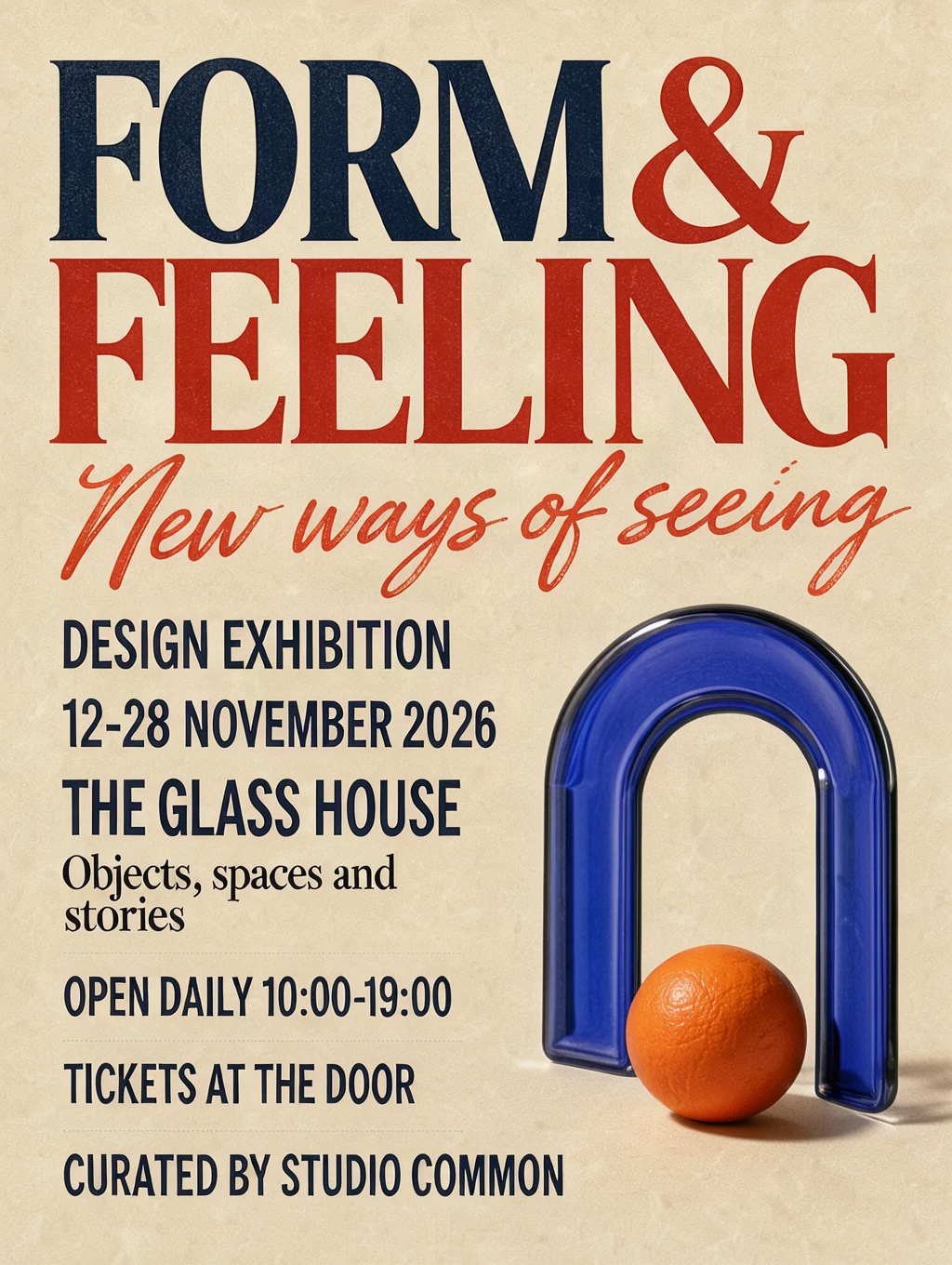
Set the headline, supporting text and object placement in your prompt. The official fal example pairs large expressive lettering with a glass arch and orange sphere. Supply the exact words and describe how the reader should move through the layout.
Make the next revision from a reference
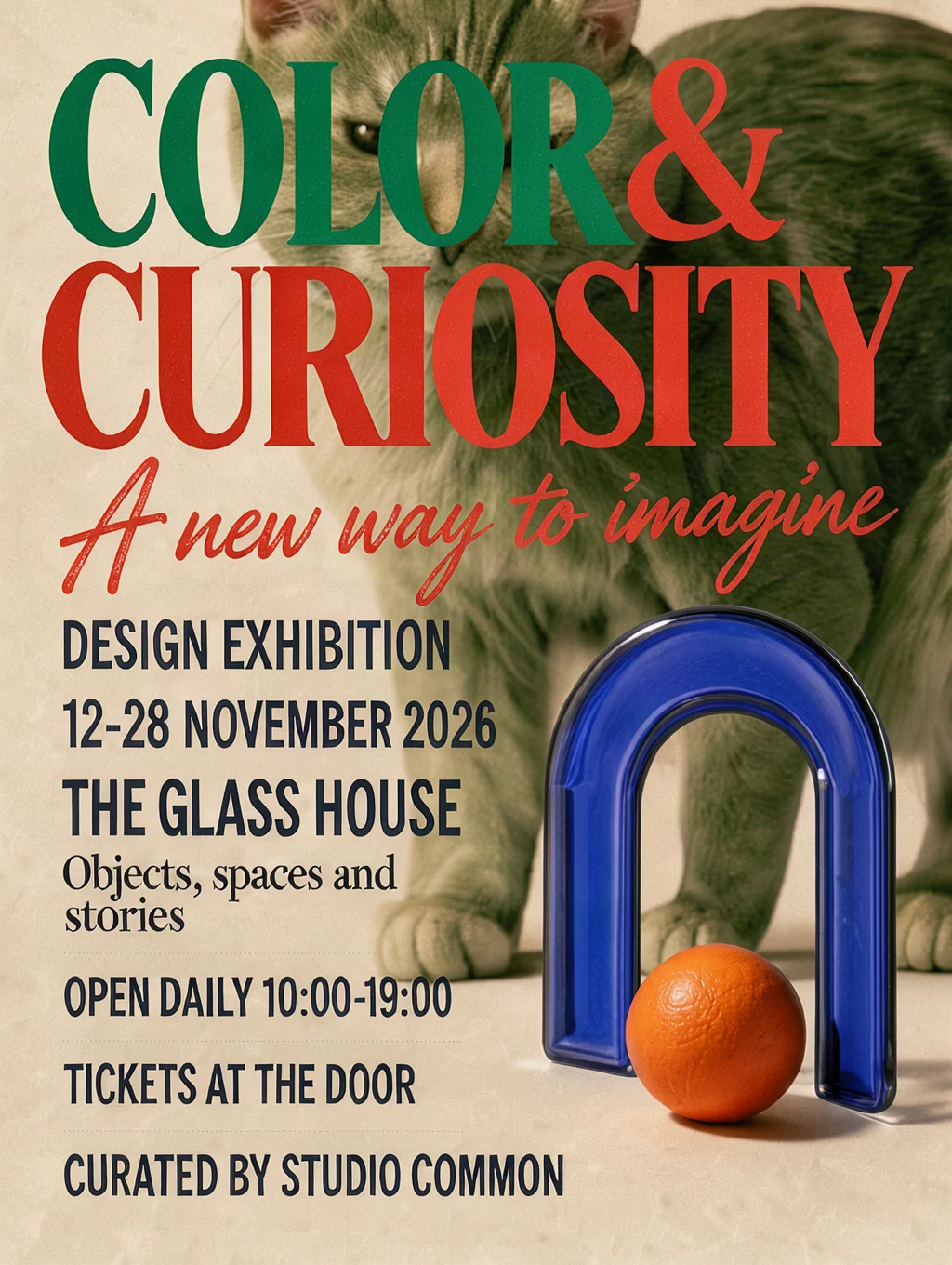
Upload the design and name the changes you want. In fal’s published edit, the headline and colors change and a cat appears behind the still life. Describe what to keep as well as what to change, then compare the full result with your starting image.
How to use FLUX 3 Image Klein
Make the brief specific, choose the output shape and check the details that matter for your use.
01 / 03
Describe the finished image
Name the subject, material, camera angle and light. For a product scene, explain which ingredients belong around the bottle and where you need clean space for a later headline.
Write a prompt02 / 03
Add references for an edit
Bring your own source image when the layout or subject is already decided. Tell the model which details to preserve and which changes to make; references are used only when you submit.
Choose references03 / 03
Review and download
Check lettering, object shapes and the edges of an edit before using the image. A larger output gives you more pixels, but does not guarantee correct details. Save the version you want to keep.
Create an imageCompare image models for your next brief
Annual plans · save 50%Compare reference limits and output sizes, or open another model to explore its examples.
Text-led concepts and reference edits with up to 10 images; choose 1K, 2K or 4K.

Create images and refine references with Flare, at the same credit cost as GPT Image 2.
GPT Image 2
HOTPrecise prompts, clean in-image text, and product-ready edits.

High-detail 1K–4K generation for polished campaign visuals.

Professional 1K/2K generation with cinematic detail and multi-reference control.
Multi-reference generation and editing with output up to 4K.
Fast fixed-1K generation and editing for high-volume iteration.
Nano Banana
FASTFast 1K generation and editing for everyday creative work.
Cinematic 2K/3K images with lower cost and multi-reference guidance.
Where FLUX 3 Image Klein fits
Use a concrete design question to guide each generation.
Event and editorial posters
Try a headline hierarchy, a limited color palette and one recognizable object. Check spelling before preparing the final artwork.
Product scene concepts
Explore a material, camera angle or lighting setup around a product. Use references when the product shape needs to carry across.
Illustrated places
Turn a written arrangement into a garden, room or small world. Describe which objects belong together and how the space should read.
Reference-led revisions
Ask for a change of lettering, color or scene elements. Compare the parts you meant to preserve before accepting the new version.
More images. Better value.
Choose monthly, yearly, or one-time credits.
Start free
$0
No payment details needed
Daily allowance · up to
3 images / day · 6 credits
A small daily allowance for occasional ideas.
- Daily credits expire; unused credits do not roll over
- Images saved for only 7 days
- Basic storage space
Pro
Recommended for regular creation
$20.00/month
Billed monthly
GPT Image 2 · 1K · up to
500 images
For individual creators making images throughout the month.
- Supports more models
- Credits valid for the paid month
- Permanent storage for all your assets
- Expanded workspace storage
- 1,000 credits each paid month
- Full downloads, no added watermark
Max
$80.00/month
Billed monthly
GPT Image 2 · 1K · up to
2,500 images
For higher-volume creation, more iterations, and larger image batches.
- Supports more models
- Credits valid for the paid month
- Permanent storage for all your assets
- Largest workspace storage
- 5,000 credits each paid month
- Full downloads, no added watermark
Start free
$0
No payment details needed
Daily allowance · up to
3 images / day · 6 credits
A small daily allowance for occasional ideas.
- Daily credits expire; unused credits do not roll over
- Images saved for only 7 days
- Basic storage space
Pro
Save 50%Recommended for regular creation
$10.00/month
$120.00 billed yearly
GPT Image 2 · 1K · up to
6,000 images
For individual creators making images throughout the month.
- Supports more models
- Annual credits valid for 12 months
- Permanent storage for all your assets
- Expanded workspace storage
- 12,000 credits delivered upfront each year
- Full downloads, no added watermark
Max
Save 50%$40.00/month
$480.00 billed yearly
GPT Image 2 · 1K · up to
30,000 images
For higher-volume creation, more iterations, and larger image batches.
- Supports more models
- Annual credits valid for 12 months
- Permanent storage for all your assets
- Largest workspace storage
- 60,000 credits delivered upfront each year
- Full downloads, no added watermark
Start free
$0
No payment details needed
Daily allowance · up to
3 images / day · 6 credits
A small daily allowance for occasional ideas.
- Daily credits expire; unused credits do not roll over
- Images saved for only 7 days
- Basic storage space
1,500 credits
$29.90
One-time payment
One purchase · up to
750 images with this pack
Add credits for a specific project without starting a subscription.
- Supports more models
- Credits valid for 180 days
- Permanent storage for all your assets
- Expanded workspace storage
- One-time packs do not renew automatically
- Full downloads, no added watermark
3,000 credits
$49.90
One-time payment
One purchase · up to
1,500 images with this pack
Add credits for a specific project without starting a subscription.
- Supports more models
- Credits valid for 180 days
- Permanent storage for all your assets
- Largest workspace storage
- One-time packs do not renew automatically
- Full downloads, no added watermark
FLUX 3 Image Klein questions
Output choices, references and practical details before you create.
What is FLUX 3 Image Klein?
FLUX 3 Image Klein is Black Forest Labs’ compact image generation and editing model, released in October 2026. This workbench uses the standard distilled version through fal. It is a different model from FLUX.2 Klein and the full FLUX 3 Image model.
Can I use FLUX 3 Image Klein without a reference image?
Yes. Write a prompt to create a new image. Add references when you want to edit an existing design or combine visual directions, and name each reference’s role in the prompt.
How many reference images can I attach?
You can attach up to 10 PNG, JPEG or WebP images, up to 10 MB each. They become editing inputs when you submit. The current quote does not increase with the number of references.
Which output sizes does FLUX 3 Image Klein offer here?
Choose 1K, 2K or 4K and one of seven aspect ratios. Here the size names mean a longest edge of 1024, 2048 or 4096 pixels; the shorter edge follows the ratio and is rounded down to a multiple of 16. Each task returns one PNG image.
How much does FLUX 3 Image Klein cost?
The workbench shows the current credit quote before submission. Resolution changes the quote; choosing an example only fills the prompt and does not submit a task or spend credits. You can use your existing iLoveAIImg credits.
Can I draw layout boxes or load a LoRA here?
This workbench offers a text prompt, reference uploads, aspect ratio and resolution. It does not expose bounding-box drawing, LoRA loading or fine-tuning. Describe the arrangement you want in the prompt.
Are these verified iLoveAIImg results?
The exhibition poster and its edited version are official examples published by fal for FLUX 3 Image Klein. The tea bottle and rooftop garden are creative references for prompt ideas, not verified Klein results. None of these images is a paid generation tested through this iLoveAIImg integration.
Will a reference edit keep every other detail unchanged?
An instruction to preserve a detail helps describe the goal, but you should still compare the result with your original. Inspect text, faces, object boundaries and surrounding areas before choosing the final image.
How does the guest trial work?
Eligible visitors receive trial credits when they enter, once per guest session. Each new guest image task requires verification; signed-in users generate without this verification. Paid credits are used first, then free credits cover any remainder. Unused daily free credits expire at the next UTC midnight, even if paid credits were used instead. If trial spending is paused or its budget is used up, your balance is kept.
Try your next idea with FLUX 3 Image Klein
Choose a prompt above or describe the image you want to make. Add references when you have a starting point worth keeping.